

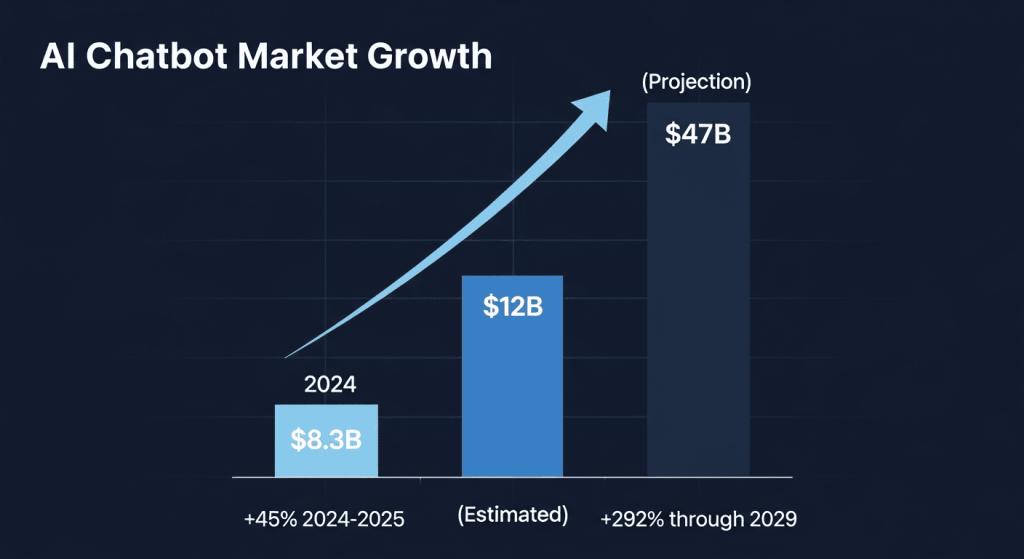
Artificial intelligence chatbots have become essential tools for productivity, research, content creation, and customer support. The AI chatbot market has exploded in recent years, growing from $8.3 billion in 2024 to an estimated $10-15 billion in 2025, with projections reaching nearly $47 billion by 2029. Whether you’re a professional looking to streamline your workflow, a business owner seeking customer support automation, or a student exploring AI capabilities, choosing the best AI chatbot can dramatically improve how you work and communicate.
This comprehensive guide explores what are the best AI chatbots available today, compares their key features, pricing models, and real-world applications. We’ll help you understand which tool suits your specific needs, from everyday tasks to specialized professional work. By the end, you’ll have a clear understanding of the strengths and limitations of leading AI chatbots and how to select the one that delivers the most value for your situation.
The Top AI Chatbots: Feature Comparison
ChatGPT: The Industry Leader for Versatility
ChatGPT by OpenAI remains the most popular AI chatbot globally, with over 200 million active users and approximately 4.8 billion monthly website visits. This widespread adoption isn’t accidental—ChatGPT offers an exceptional balance of capability, ease of use, and continuous innovation.
ChatGPT’s latest models, including GPT-5.1 and GPT-4o, deliver impressive performance across multiple domains. The platform excels at creative writing, coding assistance, complex reasoning, and detailed explanations. Users can upload images for analysis, use voice conversations for hands-free interaction, and access real-time web search capabilities. The unique Memory feature allows ChatGPT to remember personal preferences and context from previous conversations, creating a more personalized experience over time.
Pricing: Free tier with limitations; ChatGPT Plus ($20/month) for faster responses and advanced features; ChatGPT Pro ($200/month) for unlimited access and extended capabilities.
Best for: Everyday tasks, creative writing, coding, research, and general-purpose AI assistance.
Claude: The Expert’s Choice for Safety and Analysis
Claude, developed by Anthropic, has emerged as a top choice for professionals handling sensitive information and requiring deep analytical work. Claude’s standout feature is its massive context window—up to 100,000 tokens in the free version—allowing it to process entire books, lengthy contracts, or comprehensive research papers in a single conversation.
The platform implements Constitutional AI principles, resulting in thoughtful, measured responses that prioritize accuracy and ethical considerations. Claude excels at summarization, long-form content creation, legal document analysis, and complex reasoning tasks. Recent benchmarks show Claude achieving an 80.9% pass rate on software engineering tasks, the highest among major competitors. The platform’s calm, professional tone and meticulous attention to detail make it particularly valuable for research, compliance, and strategic planning.
Pricing: Free tier with limited access; Claude Pro ($20/month or $17/month billed yearly); Claude Max ($100+/month) for higher usage limits; Claude API with token-based pricing.
Best for: Long-document analysis, research summarization, creative writing with depth, legal and financial documentation, safety-conscious applications.
Google Gemini: The Multimodal Powerhouse
Google Gemini (formerly Bard) leverages Google’s extensive infrastructure and real-time data access to deliver current, accurate information. Built as a multimodal AI from the ground up, Gemini seamlessly handles text, images, audio, and video inputs—a capability that sets it apart from many competitors.
Gemini’s deep integration with Google Workspace means you can access it directly within Gmail, Google Docs, Google Sheets, and YouTube. This ecosystem integration eliminates the friction of switching between tools. The platform offers exceptional performance for real-time searches, pulling current information to answer questions about recent events with accuracy that static knowledge-based models cannot match. Gemini 2.5 Pro and Flash models provide options for both depth and speed.
Pricing: Free tier with 5 daily Gemini Advanced searches; Gemini Advanced ($19.99/month); Gemini Ultra ($249.99/month for enhanced capabilities); Gemini Code Assist for developers ($19-54/month).
Best for: Real-time research, Google Workspace users, multimodal tasks, video and image analysis, current events and news.
Microsoft Copilot: The Enterprise Integration Specialist
Microsoft Copilot is engineered for professional environments and seamless integration with Microsoft 365 applications including Word, Excel, Outlook, and Teams. This integration gives Copilot access to your business documents and email context, enabling it to provide highly relevant, personalized responses grounded in your actual work data.
Copilot demonstrates excellent sourcing and citation practices, consistently providing accurate, up-to-date information with proper attribution. The platform excels at productivity tasks—draft emails, analyze spreadsheets, research topics for presentations, and manage project workflows. For organizations already invested in the Microsoft ecosystem, Copilot offers unmatched convenience and contextual awareness.
Pricing: Included with Microsoft 365; Copilot Pro ($20/month) for enhanced standalone access; Custom enterprise pricing for business deployments.
Best for: Microsoft 365 users, business productivity tasks, document analysis within enterprise systems, teams looking for Office-native AI assistance.
Perplexity AI: The Research and Learning Specialist
Perplexity AI combines conversational AI with advanced search capabilities, making it ideal for researchers, students, and professionals who need to explore topics comprehensively with transparent source citations. Every answer includes direct links to sources, allowing you to verify information and dive deeper into referenced materials.
The platform offers both focused searches and the ability to upload files for analysis. Perplexity’s interface feels like having a research assistant who can explain topics clearly while showing exactly where information comes from. The platform integrates multiple AI models, including access to GPT-4, Claude Sonnet, and others through a single subscription.
Pricing: Free tier with 5 daily Pro searches; Perplexity Pro ($20/month or $200/year); Perplexity Max ($200/month) for heavy users with unlimited searches.
Best for: Academic research, learning new subjects, fact-checking, source verification, comprehensive topic exploration.
DeepSeek: The Budget-Conscious Developer’s Choice
DeepSeek offers powerful AI capabilities at dramatically lower prices than competitors, making it an excellent option for developers managing large-scale data handling, API implementations, or budget-conscious businesses. The platform provides strong reasoning capabilities while maintaining competitive pricing for token-based usage.
DeepSeek gained attention as a credible alternative to more expensive models, delivering solid performance without premium pricing. The open-source approach appeals to developers seeking transparency and customization options. While not as widely adopted as ChatGPT or Gemini, DeepSeek serves a critical need for cost-effective AI implementation at scale.
Pricing: API-based pricing significantly lower than OpenAI and Anthropic; free models available for development.
Best for: Developers, backend processing, large-scale data handling, budget-constrained implementations, companies seeking cost-effective API solutions.
Feature Comparison Table
| Feature | ChatGPT | Claude | Gemini | Copilot | Perplexity |
|---|---|---|---|---|---|
| Best Speed | Moderate-Fast | Moderate | Fastest | Fast | Fast |
| Context Window | 128K tokens | 100K+ tokens | 1M tokens | Varies | 100K tokens |
| Multimodal Support | Text, Images, Voice | Text only | Text, Image, Audio, Video | Text, Images | Text, Images |
| Real-time Search | Yes (Plus+) | No | Yes (native) | Yes | Yes |
| Coding Ability | Excellent (74.9% SWE-bench) | Industry-leading (80.9%) | Strong (76.2%) | Good | Moderate |
| Source Citations | Limited | Limited | Good | Excellent | Excellent |
| Free Tier Quality | Good | Good | Good | Moderate | Good |
| Price ($USD/month) | $0-200 | $0-100+ | $0-250 | $0-20 | $0-200 |
| Best Use Case | General purpose | Deep analysis | Real-time info | Enterprise | Research |
Understanding Pricing Models
Free vs. Paid Tiers
Most leading AI chatbots offer free access with limitations. Free tiers typically include basic model access, fewer monthly requests, and slower response times. They’re perfect for testing and light usage but restrict power users through message caps or usage limits.
Paid individual subscriptions cost between $15-20 monthly for most platforms. At this level, you unlock the latest models, faster processing, file uploads, and higher daily usage limits. For professionals and serious users, individual subscriptions provide excellent value.
Enterprise pricing starts at $1,000 monthly and scales based on deployment scope, team size, and customization requirements. Enterprise plans include dedicated support, security compliance, advanced analytics, and deep integrations with existing systems.
Token-Based API Pricing
Developers implementing chatbots in applications often use token-based pricing rather than monthly subscriptions. This model charges per million tokens processed—both input and output. DeepSeek offers the most competitive token pricing, while OpenAI and Anthropic premium models command higher rates. Token-based pricing works well for variable-load applications where usage fluctuates unpredictably.
Key Differentiators: Choosing Your Ideal Chatbot
Speed vs. Reasoning
Fast chatbots like Gemini Flash and Claude Haiku deliver sub-second responses ideal for customer support and real-time interactions. Slower models like Claude Opus and ChatGPT’s reasoning mode prioritize thorough analysis and complex problem-solving over speed. Your choice depends on your primary use case: real-time applications demand speed, while research and planning benefit from deliberate reasoning.
Context Window Size
A larger context window allows the AI to digest more information in one conversation. Claude’s massive window excels for document analysis and literature review. Gemini’s 1 million token context window handles extensive data processing. If you regularly work with long documents or require continuous conversation memory, prioritize context window size.
Multimodal Capabilities
Only Gemini and ChatGPT Plus offer comprehensive multimodal support for images, audio, and video. If your workflow involves analyzing images, charts, or multimedia content, these platforms are essential. Text-only platforms like Claude cannot process visual information.
Integration Ecosystem
Gemini users benefit from deep Google Workspace integration. Microsoft Copilot users gain seamless Office integration. If you’re heavily invested in either ecosystem, these integrations justify your choice. General-purpose users may prefer standalone platforms like ChatGPT or Claude that work anywhere.
Model Transparency and Safety
Claude emphasizes Constitutional AI and transparency about its design choices. OpenAI provides detailed capability documentation. Google publishes regular benchmark results. If your organization prioritizes model transparency and documented safety practices, compare published documentation before choosing.
Real-World Use Cases and Applications
Customer Support and Service Automation
Businesses worldwide implement AI chatbots to handle customer inquiries, reducing support costs by up to 30% while improving response times from hours to seconds. A retail business can deploy Gemini or Copilot to answer product questions, process returns, and escalate complex issues to human agents. Banks use chatbot technology to process thousands of daily transactions, freeing human advisors for complex advisory calls. The key to successful support automation is seamless escalation—when the bot encounters complexity, it must hand off conversations to humans with full context.
Content Creation and Marketing
Marketing teams leverage AI chatbots for lead generation, personalized email campaigns, and social media content. Perplexity AI researchers use the platform for competitive analysis and market research. Claude excels at long-form content creation for blogs, whitepapers, and strategic documentation. ChatGPT’s versatility makes it suitable for diverse content types from product descriptions to thought leadership pieces. These applications report 25% improvement in conversion rates and 3x higher engagement compared to traditional approaches.
Software Development and Coding
Developers use ChatGPT for debugging, code generation, and technical problem-solving. Claude’s superior reasoning capabilities and 80.9% SWE-bench performance make it particularly effective for complex algorithmic challenges and architectural decisions. GitHub Copilot integration within IDEs provides contextual code suggestions. These tools accelerate development velocity while reducing manual debugging time. For specialized domains like Python, Rust, or JavaScript, specific-language models may outperform general-purpose chatbots.
Research and Learning
Students and researchers use Perplexity AI for sourced research with transparent citations. Claude handles literature summarization and conceptual explanation. These platforms transform research workflows by providing accurate information with verifiable sources. Academic institutions increasingly recommend Perplexity for its commitment to source attribution and factual accuracy.
Personal Productivity
ChatGPT’s Memory feature enables personalized assistance for individuals. Users can maintain ongoing projects, track preferences, and reference previous conversations. This capability transforms the chatbot from a stateless tool into a persistent digital assistant that understands your work patterns and priorities.
Important Limitations and Considerations
Knowledge Cutoff Dates
All AI chatbots have knowledge cutoff dates beyond which their training data ends. ChatGPT’s GPT-4o has a May 2024 cutoff; Claude’s latest version has a September 2024 cutoff; Gemini’s real-time search capability partially mitigates this limitation. For current events and recent developments, verify that your chosen platform includes real-time web search capabilities.
Hallucinations and Factual Accuracy
Despite improvements, AI chatbots can generate plausible-sounding but incorrect information (hallucinations). This occurs when models extrapolate beyond their training data or misinterpret queries. For applications requiring absolute accuracy—legal documents, medical advice, financial recommendations—verify outputs with authoritative sources. Platforms emphasizing transparency like Claude and those with strong citation practices like Perplexity minimize but don’t eliminate this risk.
Privacy and Data Handling
Free tier usage on most platforms sends your conversations to company servers for analysis and improvement. If handling sensitive information, choose paid enterprise plans with privacy guarantees. Consider on-premise deployment options for highly confidential data. Always review each platform’s privacy policy before using with proprietary information.
Computational Limitations
Large requests—processing massive documents or generating extensive responses—take longer and may time out. Some platforms implement rate limits restricting daily usage. Be aware of these constraints when planning large-scale deployments or heavy usage scenarios.
Frequently Asked Questions
Q1: What is the best free AI chatbot?
ChatGPT’s free tier offers the best combination of capability and ease of use. It provides solid performance for most tasks without payment. Google Gemini’s free tier includes 5 daily Pro searches, excellent for research-focused users. Claude’s free tier offers impressive capabilities with a substantial context window.
Q2: Which AI chatbot is best for coding?
Claude leads software engineering benchmarks with an 80.9% pass rate on SWE-Bench, followed by ChatGPT (74.9%) and Gemini (76.2%). For IDE integration and contextual coding, GitHub Copilot combines ChatGPT’s capabilities with development-specific features. Choose based on your programming language and development environment.
Q3: Can I use AI chatbots for customer support?
Absolutely. Gemini and Copilot excel at customer support automation through their multimodal capabilities and integration with business systems. Dedicated customer support platforms like Tidio and Intercom also exist, but general-purpose chatbots work well for many businesses. The key is implementing proper escalation to human agents.
Q4: Which chatbot has the largest context window?
Google Gemini offers the largest context window at approximately 1 million tokens, enabling it to process entire books or extensive datasets in single conversations. Claude supports 100,000+ tokens. ChatGPT offers 128,000 tokens. For most applications, these sizes are more than sufficient.
Q5: Are AI chatbots safe for sensitive business information?
Free tiers send data to company servers; avoid sensitive information on free plans. Enterprise paid tiers typically include data privacy guarantees and may support on-premise deployment. Always review your platform’s privacy policy and security certifications before handling confidential data.
Q6: How much can an AI chatbot save my business?
Businesses report 30% reduction in customer service costs through chatbot automation, with ROI ranging from 148-200% when properly implemented. Additional benefits include faster first-response times (from hours to seconds), 24/7 availability without additional staffing, and scalability. Cost savings increase with deployment scale and use case optimization.
Q7: Which chatbot provides the most current information?
Google Gemini excels at real-time information through native search integration. ChatGPT Plus includes web search for current events. Perplexity AI specializes in current research with source citations. For topics changing frequently, verify that your chosen platform includes real-time search capabilities.
Making Your Selection: A Decision Framework
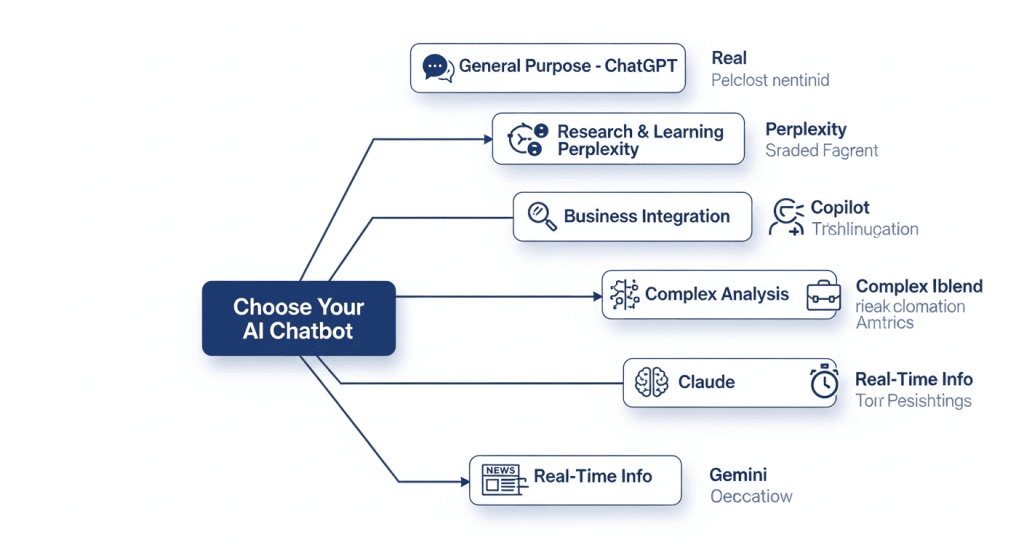
For General Purpose Use: Start with ChatGPT’s free tier. Its versatility, ease of use, and broad capability set make it the default choice for most users.
For Research and Learning: Choose Perplexity AI for sourced research or Claude for deep analysis and explanation of complex topics.
For Business Integration: Copilot for Microsoft environment; Gemini for Google Workspace; dedicated customer support platforms for specialized implementations.
For Development: Claude for complex algorithms and reasoning; GitHub Copilot for IDE integration; ChatGPT for broad coding questions and debugging.
For Budget-Conscious Scaling: DeepSeek for API implementations and large-scale data processing with minimal cost.
For Maximum Privacy: Choose enterprise tier with guaranteed privacy clauses; consider on-premise deployment options for highly sensitive data.
The Future of AI Chatbots
The AI chatbot market continues evolving rapidly. By 2027, an estimated 25% of businesses will use chatbots as their primary support channel. Models are becoming more specialized—different tools for coding versus writing versus analysis rather than one-size-fits-all solutions. Multimodal capabilities expand as voice, video, and real-time interaction become standard features.
The most successful implementations focus on specific use cases rather than replacing all human interaction. The future belongs to hybrid approaches combining AI efficiency with human expertise for complex, nuanced situations requiring judgment and empathy.
Conclusion

Choosing the best AI chatbot depends on your specific needs, budget, and use case. ChatGPT remains the versatile leader for general users; Claude excels for deep analysis and research; Gemini dominates real-time information and Google integration. Perplexity specializes in sourced research; Copilot optimizes Microsoft environments; DeepSeek delivers cost-effective scaling.
The optimal strategy involves testing multiple platforms with your actual workflows before committing. Most offer free tiers—take advantage of them to evaluate which platform delivers the best experience for your situation. As AI technology continues advancing, staying informed about new capabilities and updates ensures you’re always using tools that deliver maximum value.
Start today with a free trial, identify which platform feels most natural for your work style, and implement it into your daily workflow. The productivity gains from choosing the right AI assistant compound over time, making this decision genuinely important for your professional success.