

Writing emails consumes valuable time that professionals could spend on strategic work. In 2025, with approximately 376.4 billion emails sent daily worldwide, the demand for efficient communication solutions has never been higher. An AI email writer can transform how you compose messages, generate professional replies, and maintain consistent communication tone across your inbox.
The best AI email writer free options available today leverage advanced language models to help you draft everything from customer support responses to sales outreach. Whether you’re managing customer interactions, responding to urgent messages, or handling high-volume correspondence, free AI email writing tools provide enterprise-grade capabilities without subscription costs.
This guide explores the top free AI email writers available in 2025, analyzing their features, limitations, and ideal use cases to help you find the perfect solution for your needs.
What Is an AI Email Writer?
An AI email writer is software powered by artificial intelligence that generates, drafts, or improves email content automatically. These tools use natural language processing and machine learning algorithms to understand context, analyze your writing style, and produce human-like email responses in seconds.
Modern AI email writers handle multiple tasks: composing new messages from brief instructions, generating professional subject lines, suggesting email tones (formal, casual, urgent), providing smart reply suggestions for incoming messages, and even translating content across languages.
The technology behind free AI email writers has become sophisticated enough to match or rival paid solutions, making high-quality email assistance truly accessible to everyone. Whether you receive hundreds of emails weekly or send important business correspondence daily, these tools adapt to your communication patterns and writing preferences.
Why You Need an AI Email Writer in 2025
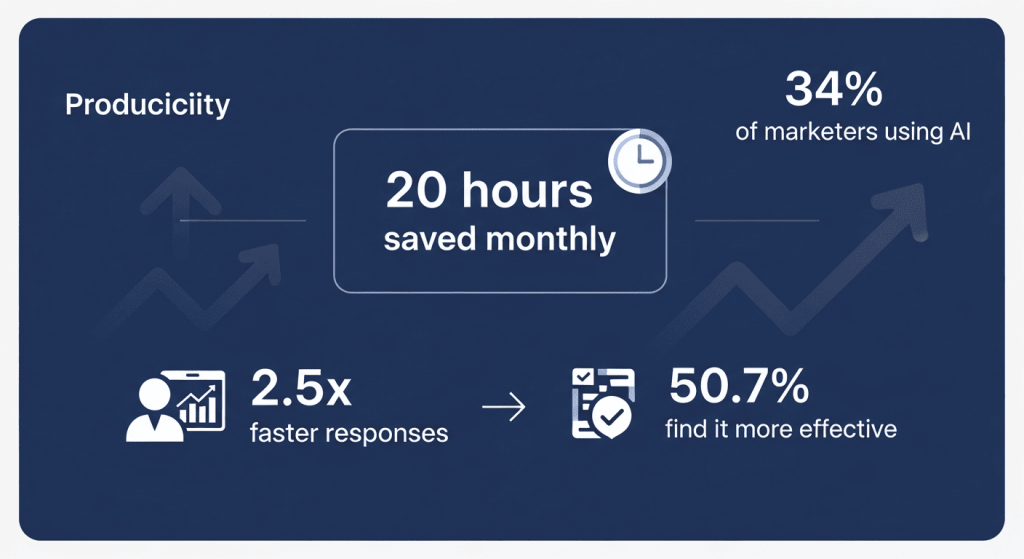
The modern workplace demands faster communication without sacrificing quality. Recent research shows that 34% of marketers use generative AI specifically for writing email copy, making content creation the most common AI application in email marketing. Additionally, 50.7% of US and EU marketers believe AI is more effective than traditional approaches in email marketing.
Key reasons to adopt an AI email writer:
- Save significant time: Users report spending 20 hours less per month on email management with AI assistance, with 2.5x faster email responses
- Maintain consistent tone: AI learns your communication style and replicates it across all messages
- Boost productivity: Professionals can focus on strategic tasks while AI handles routine correspondence
- Improve email quality: Grammar checking, tone adjustments, and professional formatting happen automatically
- Scale personalization: Generate personalized messages to multiple recipients without manual effort
- Reduce decision fatigue: AI provides ready-to-use drafts that need minimal editing
Marketing teams investing more than 15% of their budget in email achieve open rates between 20-40%, and AI email writers help maximize this investment through better-crafted messages.
Top 10 Best Free AI Email Writers in 2025
1. ChatGPT Free Version
Best For: Versatility and flexibility across all email types
ChatGPT remains one of the most adaptable AI email writers available. The free version uses GPT-3.5 and GPT-4o mini models, providing exceptional email writing capabilities without cost.
Key Features:
- Natural language understanding for complex email scenarios
- Grammar and tone correction
- Multi-language support for translations
- Smart reply suggestions for email chains
- Context understanding for personalized messages
- No subscription required for basic access
Pros: Highly versatile, unlimited daily usage on free tier, excellent for brainstorming and complex email scenarios
Cons: Requires copy-pasting between ChatGPT and email client, no direct Gmail/Outlook integration (though third-party integrations exist), may require multiple prompts for refinement
Best For: Professionals wanting maximum flexibility and diverse email writing scenarios
2. Google Gemini Free Version
Best For: Google Workspace users seeking seamless integration
Google Gemini integrates natively with Gmail and other Google services, making it ideal if you’re already in the Google ecosystem.
Key Features:
- Native Gmail integration with smart reply suggestions
- Tone and length adjustments within email composition
- Automated follow-up scheduling
- Real-time writing assistance
- Thread summarization for long conversations
- Seamless Google Workspace compatibility
Pros: Deep integration with Gmail, no learning curve for Workspace users, free access with basic features, built-in security for Workspace accounts
Cons: Limited to Google’s ecosystem, may feel underpowered compared to standalone tools, privacy considerations for individual Gmail users (data used for model training by default)
Best For: Organizations using Google Workspace who want native email AI without external tools
3. Grammarly Free Version
Best For: Grammar checking and basic writing improvement
Grammarly focuses on polishing existing email content rather than generating new messages, making it ideal for refining drafts.
Key Features:
- Comprehensive grammar and spelling detection
- Tone detection for different communication styles
- Subject-verb agreement checking
- Punctuation and sentence structure improvement
- Browser extension for Gmail and web-based email
- 100 monthly generative AI credits on free plan
Pros: Catches subtle errors other tools miss, gentle learning curve, works with any email platform, browser-based convenience
Cons: Free version lacks advanced features like tone adjustment and plagiarism detection, limited AI writing credits, misses context-specific errors occasionally, may suggest unnecessary changes
Best For: Users wanting to polish and improve existing email drafts before sending
4. AImReply
Best For: Free unlimited access with extensive customization
AImReply stands out as a specialized email writing platform offering genuine free unlimited access without daily limits.
Key Features:
- Unlimited email generation on free plan
- 17-language support
- 12 tone options (professional, casual, urgent, apologetic, friendly)
- 3 customizable length settings
- Multiple use case templates
- Fast generation speeds (seconds per email)
- Spam phrase detection
Pros: Truly free with no hidden limits, extensive language and tone options, user-friendly interface, requires only seconds to generate content, no signup complications
Cons: Less advanced than standalone AI tools, basic customization compared to premium platforms, smaller feature set than ChatGPT
Best For: Individuals and small teams sending multiple emails daily who need simple, fast generation
5. Flowrite
Best For: Streamlined workflows with browser integration
Flowrite specializes in generating full email replies from brief notes, directly within Gmail and Outlook interfaces.
Key Features:
- Browser extension for Gmail and Outlook
- Template gallery for sales, support, and HR emails
- Writing style matching (learns your communication patterns)
- Instant reply suggestions
- Grammar and translation tools
- Team collaboration features
- 14-day free trial with paid plans starting at $5/month
Pros: Seamless Gmail and Outlook integration, templates save time on recurring email types, accurate style matching, excellent for high-volume senders
Cons: Limited free trial (14 days), requires extension installation, premium features behind paywall for extended use
Best For: Professionals sending high volumes of emails daily who want Gmail/Outlook integration
6. QuillBot AI Email Writer
Best For: Free professional email generation
QuillBot provides completely free email writing assistance with no cost barriers or hidden paywalls.
Key Features:
- Completely free email generation
- Professional tone maintenance
- Grammar and clarity improvement
- Consistent tone across messages
- Idea sparking when stuck
- Context-aware email generation
- Simple, intuitive interface
Pros: Genuinely free with no limitations, professional output quality, fast generation, clean interface design
Cons: Fewer customization options than specialized tools, limited language support compared to competitors, basic feature set
Best For: Users wanting straightforward, free email writing without complexity
7. WriteMail.ai
Best For: Quick email generation with tone customization
WriteMail.ai is purpose-built for email creation, offering specialized features for rapid composition.
Key Features:
- Customizable tone and mood selection
- Multi-language support with auto-detection
- Emoji usage toggle
- Chrome extension for Gmail (beta)
- Privacy-focused (no server storage)
- Fast email generation from prompts
- Style switcher for brand alignment
Pros: Specialized for email (not general writing), privacy-conscious approach, tone/mood customization, fast processing
Cons: Limited free version features, Chrome extension still in beta, smaller user community than ChatGPT or Grammarly
Best For: Marketers and copywriters needing mood-specific email generation quickly
8. MailerLite AI Assistant
Best For: Email marketing with integrated AI tools
MailerLite combines email marketing functionality with AI writing assistance, ideal for campaigns.
Key Features:
- Forever free plan for 500 subscribers
- AI content generation for marketing emails
- AI subject line suggestions
- Subject line personalization
- Drag-and-drop editor with AI integration
- 12,000 monthly emails on free plan
- Canva integration for design
Pros: Comprehensive free plan, great for marketers, subject line optimization, integrated marketing tools
Cons: AI features require Advanced plan for premium access, less advanced than standalone AI writers, platform-specific tool
Best For: Email marketers creating campaigns who want integrated AI writing within their email platform
9. Mailmodo AI Email Writer
Best For: Professional and marketing email focus
Mailmodo specializes in crafting professional and marketing emails with audience-stage consideration.
Key Features:
- Campaign-type specific generation
- Tone customization (professional, funny, urgent)
- Word count limit settings
- Email marketing platform integration
- AI-driven subject line generation
- Secure data processing
- Free tool with basic features
Pros: Audience-stage awareness, tone variety, marketing-focused features, secure data handling
Cons: Limited by basic free tier, requires more prompts for complex emails, smaller feature set than competitors
Best For: Marketing teams creating targeted email campaigns
10. Compose AI
Best For: Free AI writing assistance with browser extension
Compose AI offers free AI writing help accessible from anywhere online through browser extension integration.
Key Features:
- Free AI writing assistant
- Browser extension for web-based writing
- Gmail integration capabilities
- Customizable writing style
- Grammar and tone improvement
- Command shortcuts for quick access
- Multi-platform support
Pros: Accessible from any browser, free basic features, quick integration, helpful command system
Cons: Limited free tier may feel restrictive for heavy users, fewer advanced customization options, smaller developer community
Best For: Users wanting accessible, free AI writing help across multiple platforms
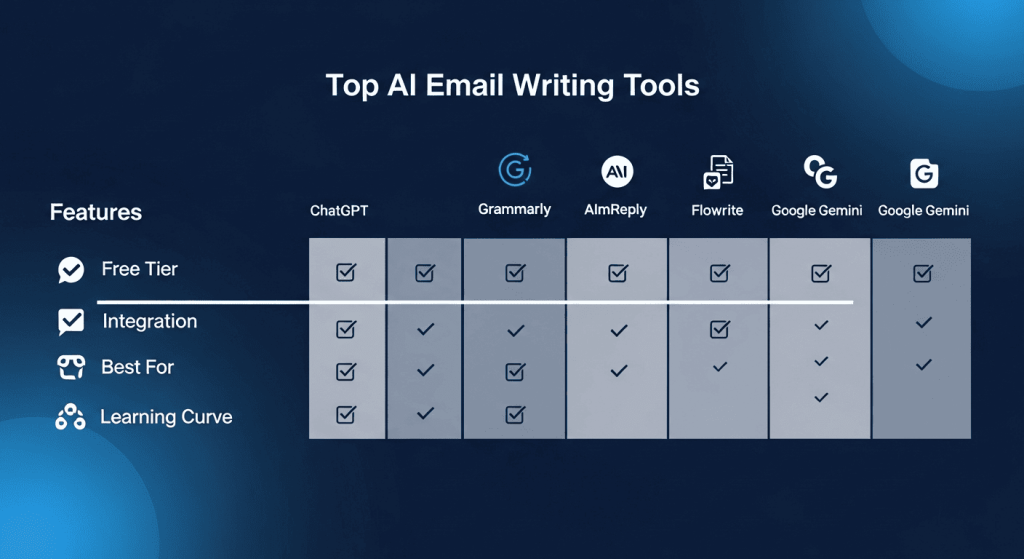
Feature Comparison Table
| Tool | Free Tier | Best For | Key Strength | Learning Curve |
|---|---|---|---|---|
| ChatGPT | Unlimited | Versatility | Maximum flexibility | Low |
| Google Gemini | Free with Gmail | Workspace users | Native integration | Very Low |
| Grammarly | 100 AI credits/month | Grammar checking | Error detection | Very Low |
| AImReply | Unlimited | Budget-conscious | No hidden limits | Very Low |
| Flowrite | 14-day trial | High-volume senders | Gmail/Outlook integration | Low |
| QuillBot | Completely free | Simple generation | Professional output | Very Low |
| WriteMail.ai | Free basic | Tone customization | Mood-specific drafting | Low |
| MailerLite | Forever free plan | Email marketing | Integrated marketing tools | Medium |
| Mailmodo | Free basic | Marketing campaigns | Audience-stage awareness | Medium |
| Compose AI | Free basic | Browser accessibility | Multi-platform access | Low |
Email Writing Best Practices with AI Tools
Prompt Crafting for Better Results
The quality of AI-generated emails depends significantly on your input instructions. Instead of “write an email,” try “write a professional but friendly email requesting a project deadline extension, acknowledging the delay.” Specificity dramatically improves output quality.
The Review-Before-Sending Rule
Never send AI-generated emails directly without review. Spend 30-60 seconds reading through the message, checking for accuracy, removing any generic phrases, and adding personalization details. This hybrid human-AI approach combines efficiency with authenticity.
Tone Matching Your Brand
Different business relationships require different tones. When using AI writers, specify your intended tone explicitly: “professional and enthusiastic,” “empathetic and supportive,” or “direct and concise.” This ensures generated emails align with your brand voice.
Personalization Elements
AI email writers excel at structure and tone but may produce generic results without personalization. Add specific details about the recipient, previous conversations, or unique circumstances. This transforms good emails into compelling ones.
Testing for Privacy Sensitivity
Before submitting customer data, financial information, or health details to any AI email writer, review the tool’s privacy policy. Some tools process data on local systems (safer), while others use cloud servers (different privacy implications).
Email Writing Trends Driving AI Adoption
The integration of AI into email marketing continues accelerating. Statistics show that 29% of marketers believe AI-powered content generation will be the most impactful email development this year. The trend toward hyper-personalization at scale requires AI tools—manually personalizing hundreds of emails becomes impossible without automation.
Seven out of 10 US marketers already employ generative AI tools in their workflows, according to recent studies. This rapid adoption reflects AI’s proven ability to enhance personalization, automate workflows, and optimize campaigns in real-time.
Mobile-first regions like South Asia and Southeast Asia report 29% higher open rates with hyper-personalized, AI-crafted content. This demonstrates that AI email writing isn’t just about speed—it delivers measurable engagement improvements.
How to Choose Your Ideal Free AI Email Writer
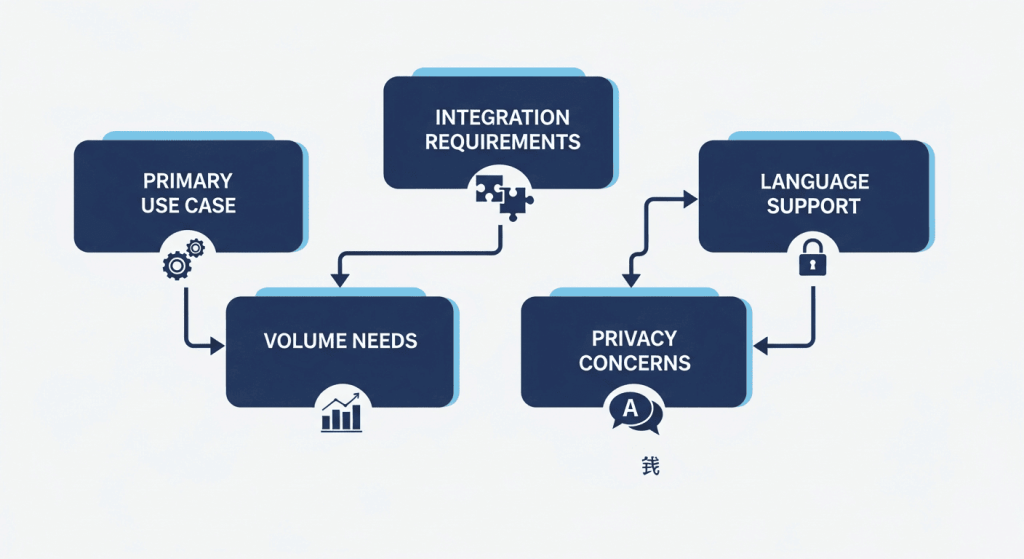
Assess Your Primary Use Case
Identify your main email writing need: customer support responses, sales outreach, marketing campaigns, or general correspondence. Different tools excel at different purposes. Flowrite dominates for high-volume routine emails, while ChatGPT suits complex, varied scenarios.
Evaluate Integration Requirements
If you spend most time in Gmail, prioritize tools with Gmail integration like Flowrite, Google Gemini, or Grammarly. Outlook users should explore MailMaestro or Flowrite. Web-based workers appreciate Compose AI or AImReply.
Consider Volume and Frequency
High-volume senders (50+ emails daily) benefit from native integrations that streamline workflows. Occasional writers find web-based tools adequate. Unlimited free plans like AImReply suit heavy daily usage better than limited-credit systems.
Privacy and Data Security
Read privacy policies carefully, especially when handling customer data or confidential information. Google Gemini for individual users collects data for model training. ChatGPT free tier also uses conversations for improvement. For privacy-sensitive communications, check if tools offer encryption or zero-access data handling.
Language and Tone Requirements
International teams or multilingual organizations should verify language support. AImReply supports 17 languages. ChatGPT handles 50+ languages. Grammarly focuses primarily on English. Tone options vary significantly—AImReply offers 12 tones while others provide fewer options.
FAQ Section
Q1: Is it safe to use free AI email writers with sensitive information?
A1: Exercise caution with sensitive data. Most free AI writers process your emails on their servers, which could pose privacy risks. Tools like Grammarly, ChatGPT, and Google Gemini have transparency policies, though data handling varies. For highly sensitive emails, consider privacy-first alternatives like Atomic Mail that use zero-access encryption. Always review a tool’s privacy policy before pasting sensitive customer information or confidential business details.
Q2: Can free AI email writers match paid tools in quality?
A2: Absolutely. Modern free AI email writers using GPT-3.5, GPT-4o mini, or Google’s Gemini models produce quality comparable to many paid tools. The main differences lie in volume limits, advanced customization, and integrations rather than output quality. ChatGPT free version, for instance, delivers professional-grade emails matching paid competitors. Your specific use case determines if free tools suffice.
Q3: Which free AI email writer is best for customer support emails?
A3: Flowrite excels for support emails through its specialized templates and team collaboration features. Alternatively, AImReply’s 12 tone options allow you to match your brand’s support voice perfectly. For quick replies, ChatGPT provides flexibility to handle diverse customer scenarios. Test each tool’s support templates with your typical customer inquiries.
Q4: How do AI email writers handle different professional contexts?
A4: Top-tier free tools like ChatGPT and AImReply understand context through conversational prompts. ChatGPT lets you specify the email’s purpose, audience, and desired tone. AImReply offers preset tones and use-case categories. Flowrite’s templates provide context-specific guidance for sales, support, and HR emails. The better you describe your situation, the more accurately the AI tailors its output.
Q5: What’s the difference between an AI email writer and email templates?
A5: Templates provide static frameworks you customize manually. AI email writers generate completely new, personalized content adapted to your specific situation. This distinction matters: a template gives you a starting point; an AI writer produces finished-quality emails requiring minimal editing. AI writers scale personalization automatically across hundreds of emails—templates don’t.
Q6: Can I use AI-generated emails for professional business communication?
A6: Yes, but with guidelines. AI-generated emails work excellently for routine correspondence, responses, and outreach when reviewed before sending. For highly formal communications (contracts, official policies, major proposals), human writing remains preferable. Best practice: use AI to draft, then review and personalize before sending. This combination provides efficiency with authenticity.
Q7: Do free AI email writers require any special setup or software installation?
A7: Setup varies by tool. ChatGPT and Google Gemini require account creation but no installation. Grammarly, Flowrite, and Compose AI need browser extensions. AImReply, MailerLite, and QuillBot work web-based without installation. Most tools require 2-5 minutes for initial setup. No advanced technical knowledge is necessary—these tools prioritize user accessibility.
Conclusion: Choosing Your Email Writing Partner

The best AI email writer free depends on your specific needs, but one truth applies universally: AI email assistance is no longer a luxury—it’s a productivity necessity in 2025. Whether you prioritize Gmail integration, unlimited free access, tone customization, or specialized marketing features, multiple exceptional free options exist.